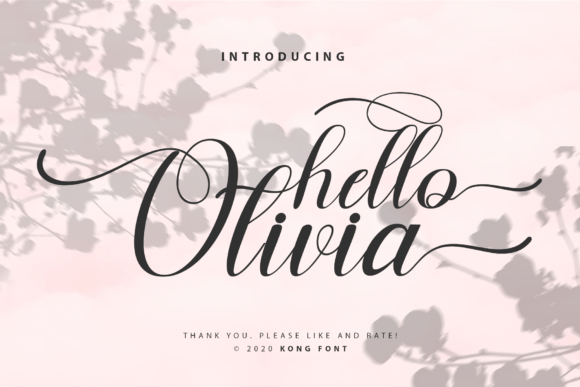
Hello Olivia: A Playful Script Font for Creators
Hello Olivia is a modern, hand-drawn script font designed with warmth and rhythm in mind. Its flowing lowercase letters, subtle bounce, and gentle contrast make it feel both approachable and intentional—not overly formal, never stiff. Created by Kong Font Studio and available on Creative Market and Creative Fabrica, Hello Olivia is built for real-world use: it’s OpenType-enabled, includes standard ligatures, and supports Latin-based languages.
Why It Fits Different People—Differently
What makes Hello Olivia useful isn’t just how it looks—it’s how it fits into someone’s workflow, goals, and comfort zone. A small business owner choosing fonts for Instagram posts cares about speed and consistency. A homeschooling parent designing a birthday banner wants charm without complexity. A freelance designer building a brand identity weighs flexibility against personality. And a beginner using Silhouette Studio for the first time needs clarity—not confusion—when installing or layering text.
For Crafters & Hobbyists
If you cut vinyl, stamp cards, or stitch embroidery patterns, Hello Olivia works where many scripts fail: it holds up at small sizes and stays legible when cut or printed on textured paper. Its slightly rounded terminals reduce fraying in vinyl weeding, and its natural spacing means less manual letter adjustment in Silhouette Design Studio or Cricut Design Space. One quilter used it to label fabric bundles—handwritten-style but consistent—and found it faster than redrawing each label in Procreate.
For Educators & Parents
Teachers creating classroom posters, flashcards, or digital worksheets often avoid script fonts—fearing readability issues or licensing confusion. Hello Olivia avoids that trap. Its letterforms are distinct (no ambiguous a/o or i/j overlaps), and its commercial license covers printable PDFs, Google Slides, and Canva templates—even those shared with students or sold in teacher marketplaces. A Montessori tutor told us she uses it for “sound blending cards” because children recognize the shapes quickly, yet it still feels joyful—not childish.
For Designers & Freelancers
Professionals appreciate that Hello Olivia doesn’t force a single mood. It can lean sweet (paired with soft pastels and hand-drawn icons) or confident (set large and bold over minimalist photography). Because it’s compatible with Photoshop, Illustrator, and Affinity apps—and includes alternate characters and swashes—you’re not locked into one look. One branding designer used its stylistic alternates to create two versions of a client’s monogram: one delicate for packaging, one bolder for signage—same font, no extra purchase.
For Small Business Owners
When your time is scarce and your budget tight, font choices impact more than aesthetics—they affect how fast you launch a product, update social media, or respond to client requests. Hello Olivia installs like any desktop font (no cloud subscription, no monthly fee), works offline, and requires no special plugins. That means you can drop it into a Canva template, tweak spacing in PowerPoint, or export a PNG from Photoshop—all without learning new software. A ceramicist used it across her Etsy shop banner, product tags, and email headers—keeping visual cohesion without hiring a designer.
What You’ll Notice Right Away
You don’t need design training to spot what sets Hello Olivia apart:
- It breathes. Letters have natural entry and exit strokes—not rigid connections—so words flow instead of clumping.
- It’s forgiving. Slight variations in weight and curve mean it looks handmade, not robotic—ideal if you want authenticity without custom illustration.
- It plays well with others. Pair it with clean sans-serifs (like Poppins or Inter) for balance, or layer it over watercolor textures without losing definition.
Things to Keep in Mind
Like any tool, Hello Olivia shines brightest when matched to the right task. It’s not meant for dense body text, legal disclaimers, or interfaces requiring high accessibility contrast. If your project demands strict WCAG compliance for screen readers or multilingual support beyond Western European languages, you’ll want to pair it thoughtfully—or choose a companion font for functional sections.
Beginners often ask: “Is this hard to install?” Short answer: no. On Windows or macOS, double-click the .OTF file and click “Install.” In Silhouette Studio, place the font file in your local Fonts folder first—then restart the app. No admin rights needed. No trial period. No hidden tiers.
A Real-World Example: From Idea to Output
Say you run a local plant shop and want to update your weekly newsletter. You open Mailchimp, choose a simple template, and swap the headline font for Hello Olivia. You type “This Week’s New Arrivals,” adjust tracking to +20 for airiness, and export. Total time: under 90 seconds. The result? Warmth without whimsy, professionalism without stiffness—exactly what helps customers pause mid-scroll.
Does Hello Olivia Fit Your Next Project?
Ask yourself:
- Do you need a script that feels human—but won’t require hours of kerning adjustments?
- Are you working across tools (Photoshop for mockups, Silhouette for cutting, Canva for social)?
- Is your goal to reinforce a feeling—playfulness, care, craft—not just fill space?
- Do you value clear licensing that covers both personal and commercial use, including resale of physical items (like mugs or stickers)?
If yes to two or more, Hello Olivia is likely a practical match—not just a pretty option.
It won’t replace a full type system. But for invitations, labels, quotes, logos, lesson plans, or product packaging, it delivers expressive clarity without complexity. And sometimes, especially when you’re juggling ten roles at once, that balance is exactly what makes a font worth keeping.